Leopard Font Evaluation
Designers and creators constantly seek typefaces that offer distinct visual character while maintaining functional versatility. Among the various options available, Leopard presents a specific niche as a unique decorative font designed to elevate creative projects. This evaluation explores the capabilities of Leopard, its technical specifications, and the practical considerations necessary for integrating it into professional workflows.
Understanding the Leopard Typeface
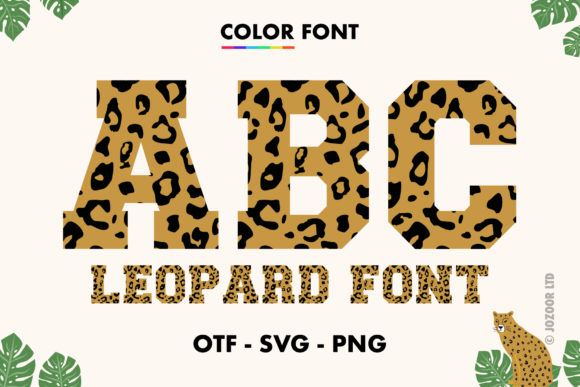
Leopard is not a standard text font intended for long-form body copy or dense paragraphs. Instead, it functions as a display or decorative typeface. Its primary design philosophy centers on creating immediate visual impact. The characters are stylized to mimic patterns or textures often associated with animal prints, providing a bold aesthetic that can serve as a focal point in a composition.
The defining characteristic of this product is its format as a color font using OpenType-SVG technology. Unlike traditional monochrome fonts where the user must apply colors manually via software tools, Leopard embeds multiple colors directly within the glyph data. When rendered correctly by compatible software, the text appears with intricate gradients, shadows, and texture details without requiring complex layering or manual coloring techniques.
Applications and Creative Use Cases
Due to its striking appearance, Leopard is particularly well-suited for projects where typography acts as the primary graphic element. Designers frequently utilize such fonts in scenarios where quick recognition and strong visual hierarchy are required.
- Crafting and Physical Media: The font is effective for crafting projects, including custom signage, scrapbooking elements, and handmade cards. The embedded colors can reduce the time spent on post-processing physical materials.
- Apparel Design: For t-shirt designs, the decorative nature of the font allows for eye-catching graphics that stand out against fabric backgrounds. It is ideal for statement pieces rather than subtle detailing.
- Print Marketing: Posters and flyers benefit from the high-contrast look of the font. In advertising, where seconds matter, Leopard can capture attention more effectively than standard sans-serif or serif options.
- Digital Presentations: In slide decks or digital presentations, using Leopard for headers or key statistics can break the monotony of standard corporate templates.
- Book Covers: For fiction genres such as fantasy, adventure, or thrillers, the font's texture can convey mood and theme instantly, making it a strong candidate for cover art.
In these contexts, adding the font to a creative idea often results in a project that stands out due to its inherent complexity and visual richness.
Technical Compatibility and Software Support
Before purchasing or downloading a specialized font, understanding software compatibility is critical. Leopard utilizes the OpenType-SVG (Scalable Vector Graphics) format. This format allows for rich color and transparency but requires specific rendering engines to function correctly.
The font is fully compatible with industry-standard vector and raster editing software. Users can expect full functionality when working within:
- Adobe Photoshop: Allows for layer-based manipulation while retaining color data.
- Adobe Illustrator: Ideal for vector-based scaling and further graphic modification.
- Silhouette Studio: Compatible for users utilizing Silhouette cutting machines, provided the software version supports SVG fonts.
- Inkscape: A robust open-source alternative that handles SVG fonts effectively.
For these platforms, the font renders as intended, displaying all embedded colors and effects automatically.
Hardware Limitations: Cricut Considerations
A significant tradeoff exists regarding compatibility with certain cutting machine ecosystems. Specifically, the OTF (OpenType Font) and TTF (TrueType Font) files included with this product are not compatible with Cricut Design Space. Cricut machines typically rely on single-color vector paths for cutting operations and do not support the multi-layered color data found in OpenType-SVG files.
If your workflow involves Cricut machines for vinyl cutting or cardstock printing, relying on the standard OTF/TTF versions will result in a loss of the decorative color features. You may need to use alternative methods, such as converting the text to shapes in a different program before importing to Cricut, or selecting a different font specifically optimized for that hardware.
Evaluating Suitability for Your Project
Deciding whether to incorporate Leopard into a project requires balancing aesthetic goals with technical constraints. The following insights can help determine if this typeface aligns with your specific needs.
When Leopard is a Strong Fit
This font is an excellent choice when the goal is to create a piece of work that demands immediate visual interest without heavy post-production effort. If you are designing a poster, a book cover, or a digital banner where the text itself is the main image, Leopard provides a "ready-made" graphic quality. It is also beneficial for designers who work in environments where they have control over the final output medium, ensuring that the software used for creation matches the software used for display.
When Alternatives May Be Worth Considering
Conversely, there are situations where Leopard may not be the optimal solution. If your project requires the text to be read across long distances, such as in a small mobile interface or a legal document, the decorative nature of the font may hinder readability. Furthermore, if your distribution channel relies heavily on older operating systems or web browsers that do not support OpenType-SVG, the font may revert to a default state or fail to render the colors entirely.
Additionally, if your production process involves mass printing on varied substrates where color consistency is difficult to maintain, a simpler, monochrome font might offer better reliability. For users strictly dependent on Cricut machines for their primary cutting workflow, the lack of native support for the color data means that alternatives with dedicated Cricut-compatible color fonts would be more efficient.
Practical Decision-Making Insights
To ensure success with this product, creators should verify their software environment prior to integration. Check that your version of Photoshop, Illustrator, or Silhouette Studio is up to date, as updates often improve support for newer font formats like OpenType-SVG.
It is also advisable to review the Ultimate Font Guide mentioned in the product documentation. These guides typically provide step-by-step instructions on how to install the font, troubleshoot rendering issues, and maximize the utility of the color data. Understanding the limitations of the file types is equally important; knowing that the OTF and TTF files do not carry the same color information as the SVG version prevents frustration during the design process.
Conclusion
Leopard serves as a specialized tool for designers looking to add a distinctive, colorful flair to their work. Its strength lies in its ability to simplify the creation of complex typographic graphics through its OpenType-SVG architecture. While it offers powerful benefits for posters, apparel, and digital media within supported software environments, it carries specific limitations regarding hardware compatibility, particularly with Cricut machines.
By carefully assessing the technical requirements of your project and the software stack you intend to use, you can determine if Leopard is the right asset to make your creative ideas stand out. For those seeking a font that combines decoration with ease of use in compatible programs, it remains a compelling option.